
AnyBot
An AI assistant that runs on your own computers.
It chats, and it does things: files, commands, web pages, the screen in front of you, and jobs on a clock.
中文 · English




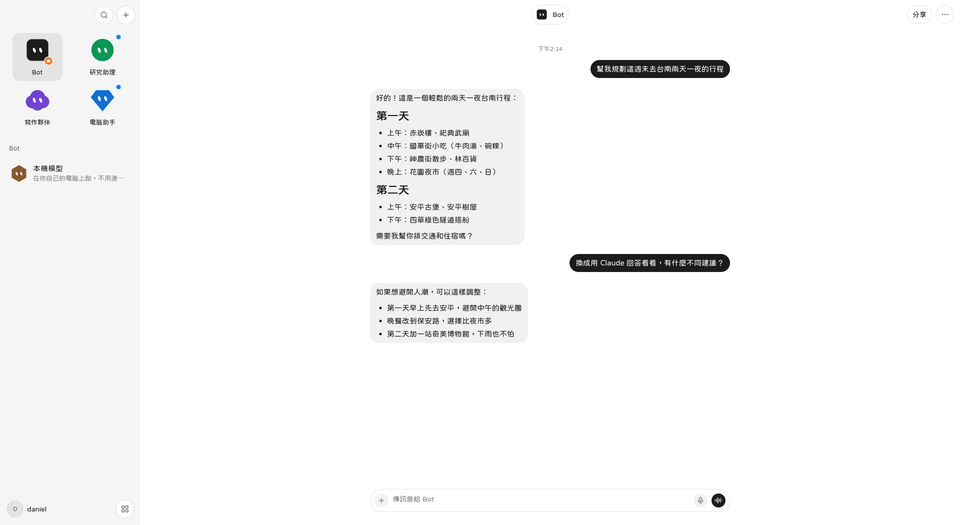
You bring the model key: xAI, OpenAI, Claude, Gemini, OpenRouter, OpenCode Go, Ollama at home, or anything that speaks the OpenAI API. Chats, files, and passwords stay on your machines instead of landing in someone else's account server. Each row on the left is a bot — research, writing, “touch the computer” — and each can use a different model.
---
## Install in 30 seconds
Open a terminal and paste one line.
```sh
# macOS, Linux (not Ubuntu-only: apt, dnf, yum, pacman, zypper, apk, xbps)
curl -fsSL https://code.30cm.net/daniel.w/AnyBot/raw/branch/main/install.sh | sh
```
```powershell
# Windows 10/11 (x64, arm64)
irm https://code.30cm.net/daniel.w/AnyBot/raw/branch/main/install.ps1 | iex
```
It installs what it needs, asks which piece you want, and walks through the first setup. The first build takes 5–15 minutes, later updates 1–2. It lives in your user folder and needs no administrator account.
Then open AnyBot (on a Mac, the first time: right-click the icon › Open), paste an API key under Settings › Models, make a bot, and talk to it. No key? Pick Ollama and it runs on your own machine.
**Account server + brain** (any Linux with Docker, 2 GB RAM or more; it asks for a domain, a user, a password, and handles HTTPS itself):
```sh
curl -fsSL https://code.30cm.net/daniel.w/AnyBot/raw/branch/main/install.sh | sh -s -- server
```
**Headless hands** (a computer for the bot to use; a screen is optional). The URL and the pairing code come from “Add a computer” in AnyBot:
```sh
curl -fsSL https://code.30cm.net/daniel.w/AnyBot/raw/branch/main/install.sh \
| sh -s -- hands https://your-address 482913
```
```powershell
# Hands on Windows
$env:ANYBOT_MODE='hands'
$env:ANYBOT_PAIR_URL='https://your-address'
$env:ANYBOT_PAIR_CODE='482913'
irm https://code.30cm.net/daniel.w/AnyBot/raw/branch/main/install.ps1 | iex
```
Running this from an agent, with no questions asked: `sh install.sh --print` reports what fits this machine, then use the environment variables — see [install/AGENT.md](install/AGENT.md).
---
## It asks before it acts
Say “do this on my computer” and it does not just run it. You see the exact step and choose allow once, always, or no. Sending, paying, and deleting are asked every time, even when you turned the other prompts off.
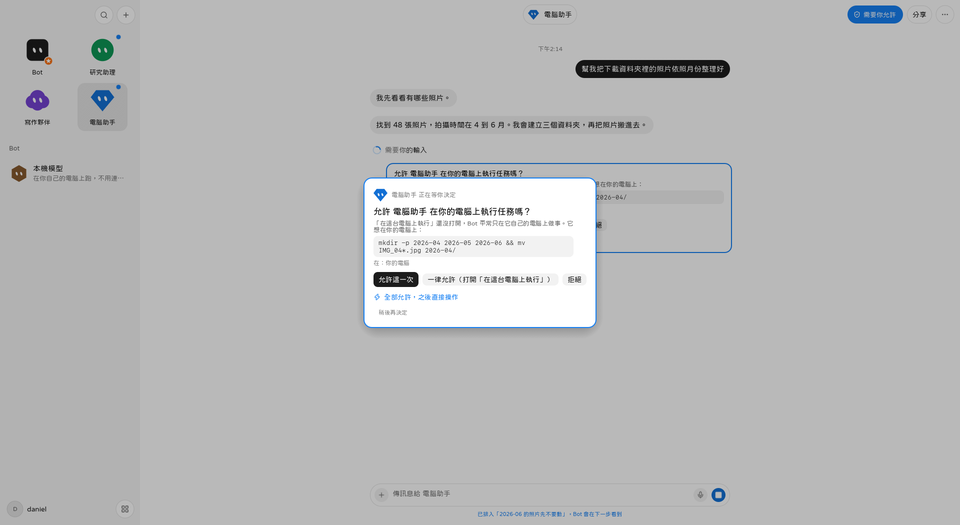
- **Files and commands** — it asks first. Or it works only inside its own computer, a small desktop kept apart from yours.
- **Web pages and forms** — its own browser. Passwords and card numbers are filled by the app, not read out to the model.
- **The screen you are using** — it reads the buttons in the screenshot, then clicks. If it needs you to sign in, it hands you the screen.
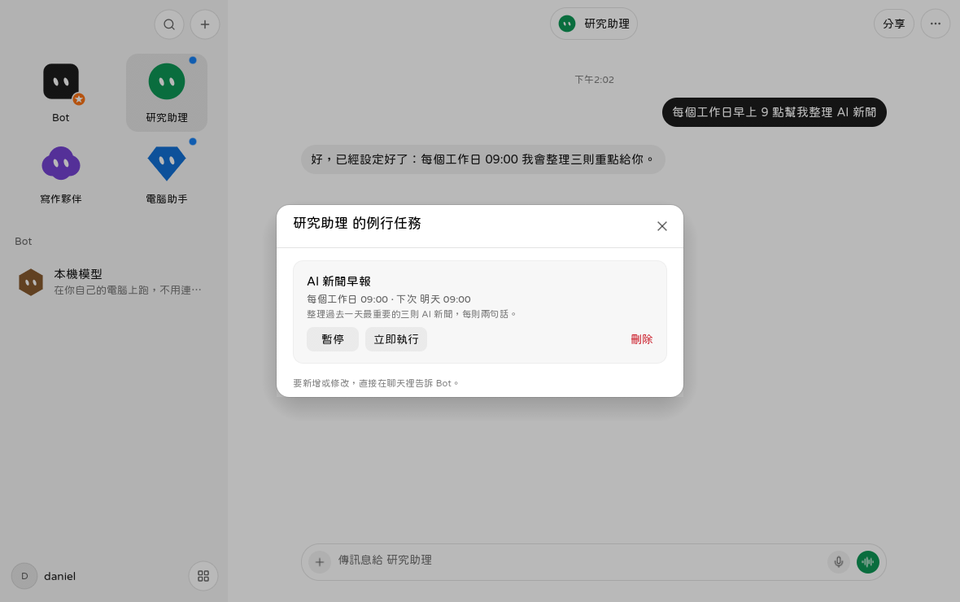
- **A clock** — “every weekday at 9, three news items” becomes a routine.
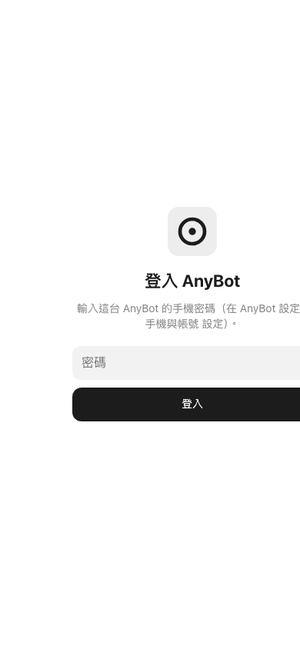
- **A phone, from anywhere** — open your URL in a browser, sign in, and it is the same chat.
---
## One machine thinks, others get used
One machine remembers and thinks (the **brain**). Others are there to be used (the **hands**). The phone is only a window. They all meet on an **account server you run**, so the computers at home do not open a port or need a public address.
```
you on the phone you on a laptop a computer with no screen
\ | /
└───── account server (it only connects them) ─────┘
|
brain: bots, chats, memory, routines live here
|
hands: the brain asks this machine to see, click, read, browse
```
| Role | What you do |
|---|---|
| Brain | Set up the server once, or use a Mac that stays awake |
| Screen | Install the desktop app and sign in to the same account |
| Hands | Press “Add a computer” and paste the line it shows |
| Phone | Open your URL in a browser and add it to the Home screen |
No server yet? Use one always-on Mac as the brain — see option B in [docs/multi-device.md](docs/multi-device.md).
---
## What happens to a sentence
```mermaid
flowchart TD
you[You: desktop app or phone]
relay[Account server
relays only, stores no chats]
brain[AnyBot on the brain]
model[The model you picked]
ask[Touch the computer? Ask first]
box[The bot's own computer
a small desktop in Docker]
hands[One of the hands
your Mac, Linux, or Windows]
you --> relay --> brain
brain --> model
brain --> ask
ask --> box
ask --> hands
```
1. You send a message on the desktop or the phone. The phone does not think for itself; it reads the same chat on the brain.
2. The brain hands that sentence, the bot's instructions, and its tools to the model you picked.
3. If the model only answers, it writes back. If it wants to read a file, open a page, or click something, it proposes an action.
4. That action goes through AnyBot's own rules first — the model does not decide whether it is allowed.
5. Once you allow it, the action runs on **the computer you chose**: the isolated desktop, the one you are using, or a paired hand.
6. The result goes back into the chat. Phone and laptop show the same thing because both read the brain.
Three programs are enough, and there is no database server: `anybot` (the desktop, the background service `anybot --serve`, and the terminal setup `anybot setup` are this one file), `anybot-relay` (the account server; computers connect out to it), and the phone page (one file, built into the app). Details in [docs/architecture.md](docs/architecture.md).
---
## Documents
| You want… | Read |
|---|---|
| Phone, brain, hands, “it will not connect” | [docs/multi-device.md](docs/multi-device.md) |
| A platform failed, build it yourself | [docs/install.md](docs/install.md) |
| How the code is layered | [docs/architecture.md](docs/architecture.md) |
| The account server's API | [docs/protocol.md](docs/protocol.md) |
| Trust boundaries, where keys live | [SECURITY.md](SECURITY.md) |
| Every feature, listed | [FEATURES.md](FEATURES.md) |
| Packaging, CI | [docs/release.md](docs/release.md) |
| Editing this README without breaking the layout | [docs/readme-style.md](docs/readme-style.md) |
Chinese is the source of truth; `docs/en/` is a summary for people who do not read Chinese.
## Hack on it
```sh
git clone https://code.30cm.net/daniel.w/AnyBot.git
cd AnyBot
make deps && make && make install
```
`make run` opens it, `make test` runs the tests, `make help` lists everything.
## License
Apache-2.0, see [LICENSE](LICENSE).